|
Main Window
The upper part of the main window contains tabs that represent different sections of the program. To switch to the desired tab click it with your mouse. There are four tabs available: Main Items, Custom Items, Cleaner's Options and Additional Settings. The lower part of the main window contains buttons used to perform various actions.
Clean Now
After you have configured Internet Cleaner to clean out the desired items press the 'Clean Now' button to start cleaning. All the items selected on the 'Main Items' tab and the 'Custom Items' tab will be cleaned out.
Help
Opens help file.
Register/About
If the button reads 'Register' the program has not been registered yet. Otherwise the button reads 'About'.
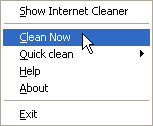
Tray Menu
Internet Cleaner places an icon to the TaskTray notification area (near the system clock). By right-clicking Internet Cleaner icon in TaskTray you can perform most of the available actions without switching to main
window.
|


