|
Load at Windows startup
Automatically starts Internet Cleaner at Windows startup.
AutoMinimize at startup
Minimize main window in the tray at startup.
Stealth on Minimize
Hide from taskbar and system tray on minimize.
Note: It is used only with next option
Enable Hot Key to Minimize/Restore main window
Allows to specify system hot-key (works anywhere) to activate Internet Cleaner main window from minimized state.
Show Tip of the Day at startup
Shows "Tip of the day" window at program start.
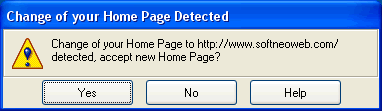
Protect IE Home Page from being changed
Set this option to protect Internet Explorer
'Home page' setting from getting changed by rogue web sites. Internet Cleaner remembers current 'Home page' setting on startup and if later on this setting gets changed Internet Cleaner will show you the notification window:
Integrate with Internet Explorer
Check this option to add a button to Internet Explorer toolbar that will allow you to run Internet Cleaner right from your browser.
|


