Home
Internet Cleaner Online Manual
Welcome
Introduction
Program Features
License Agreement
Quick Start
Quick Start
Settings
Main Items
Internet Explorer
Netscape Navigator
Opera
MS Office
Plug-ins
Custom Items
Cleaner's Options
Additional Settings
Command Line Parameters
How to ...
How to Begin cleaning
Support
Contact Information
Ordering and Registration Information
How to Order Internet Cleaner
How to Register Internet Cleaner
Frequently Asked Question (FAQ)
    How to Begin cleaning


1. Press the 'Clean Now' button.


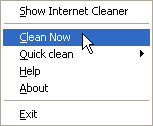
2. Press the 'Clean Now' item in Tray menu.


Note: It is strongly recommended that you shutdown all the programs that you want to erase, because some tracks can not be erased when these program are running.